Every running project on one screen. Hours included.
Taskstand is project management for people who work for clients. Tasks as simple as a to-do list, with planning in working days, time tracking and per-section sharing already in it. No second tool for your hours, no spreadsheet to work out what still has to go on an invoice.
14 days of everything Pro offers. No credit card.

From the task coming in to the line on the invoice
Everything a working day needs, without the buttons you never press.
One dashboard
Status, progress, hours, what is still unbilled and which deadline is coming up. One row per project, which unfolds into its sections.
Today
Everything dated today or earlier, overdue on top, with a day strip that shows where your hours went.
List, board or timeline
Three ways to look at the same project. Your choice is remembered per project.
Quick add
Type a task with a date, a priority and a label in one line and they are all set. In English and in Dutch.
Recurring tasks
Daily to yearly, on a fixed schedule or only after completion. The task stays one row, with its comments, files and hours attached.
Your data stays in Europe
Stored in Germany and the Netherlands, never sold and never used to train AI. With two-factor authentication and passkeys.
Comments and files
Comment in markdown, mention someone with @, attach files to a task or to a comment. An activity log per task.
Notifications
By mail and in the app when someone assigns you a task, mentions you or comments. Switched off per type and per channel.
Works the way you do
English or Dutch, light or dark, three densities and keyboard shortcuts.
In your own calendar
Publish as many calendar subscriptions as you like, each with its own filters. Every plan has them.
Archive and undo
Put tasks away until you need them again, and put back the last twenty changes, a ticked off recurring task included.
Drag and paste
Drop files anywhere in an open task, or on the comment you are writing. Pasting an image does the same.
Start with today, not with your whole list
Tasks dated today or earlier, with everything overdue on top in its own red island. The day strip above it shows where today's hours went, with your running timer in it and a marker on now.
Try for free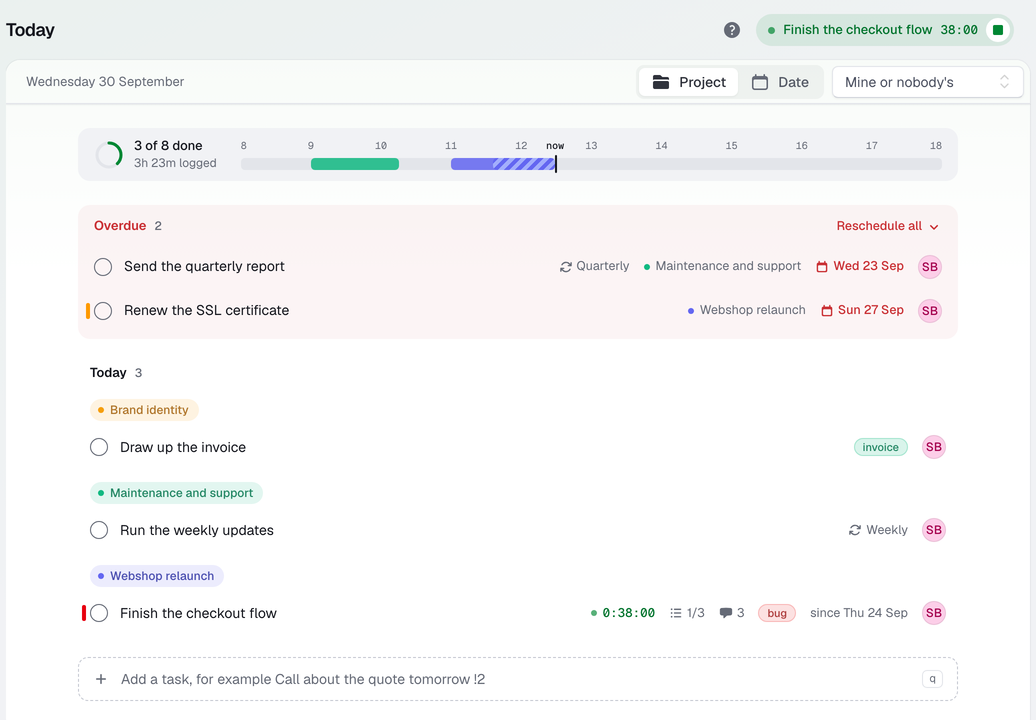
Sections, subtasks and everything in its place
Drag tasks between sections, complete one with a single key, give a whole section a priority or an owner at once. A section can be shared, completed or archived in one go. Folders in the sidebar keep your clients apart.
Try for free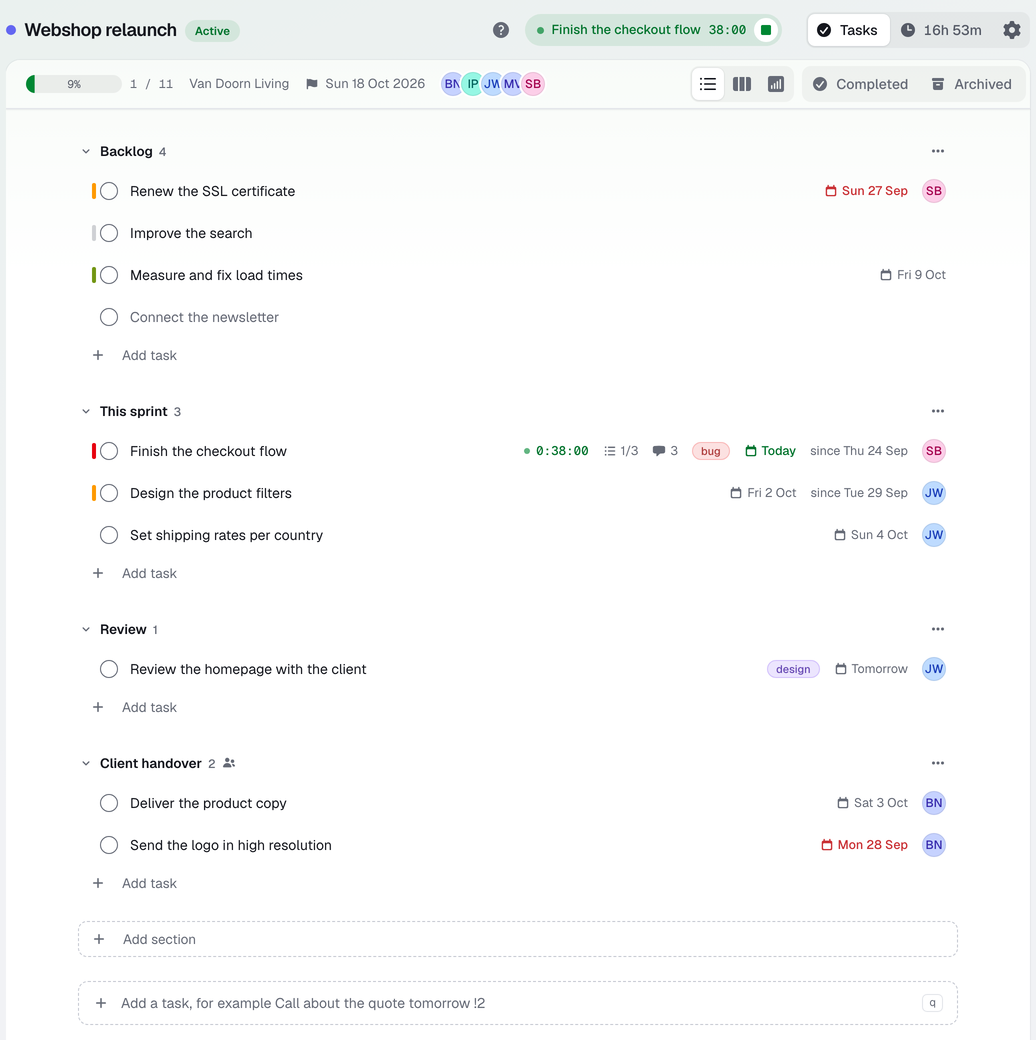
The same tasks in columns when that reads better
Every section is a column and every task a card, with its labels, its priority and who it belongs to. Drag a card to another column and it changes section. List, board and timeline are three ways of looking at one project, and your choice is remembered per project.
Try for free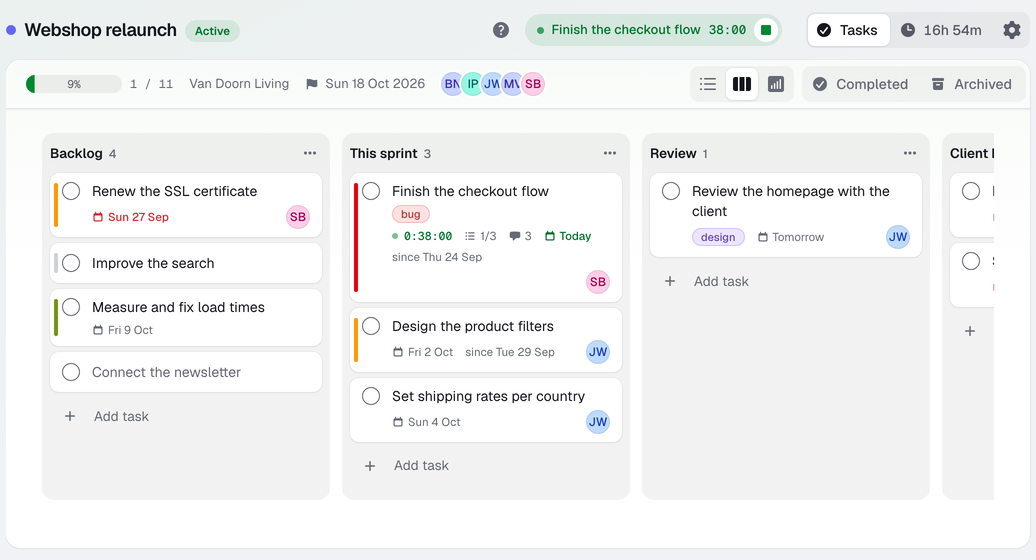
See what runs when, in working days
Give a task a duration and it becomes a bar, from its start date to the day it is due. Leave it out and it stays a milestone. Drag a bar, pull it longer at the edge, or click an undated task onto the day it belongs. The count is in working days, so a job of four days that moves to Thursday grows over the weekend, and that weekend is a gap in the bar rather than work. Everyone sets their own work week, and a task follows the week of whoever it is assigned to.
Try for free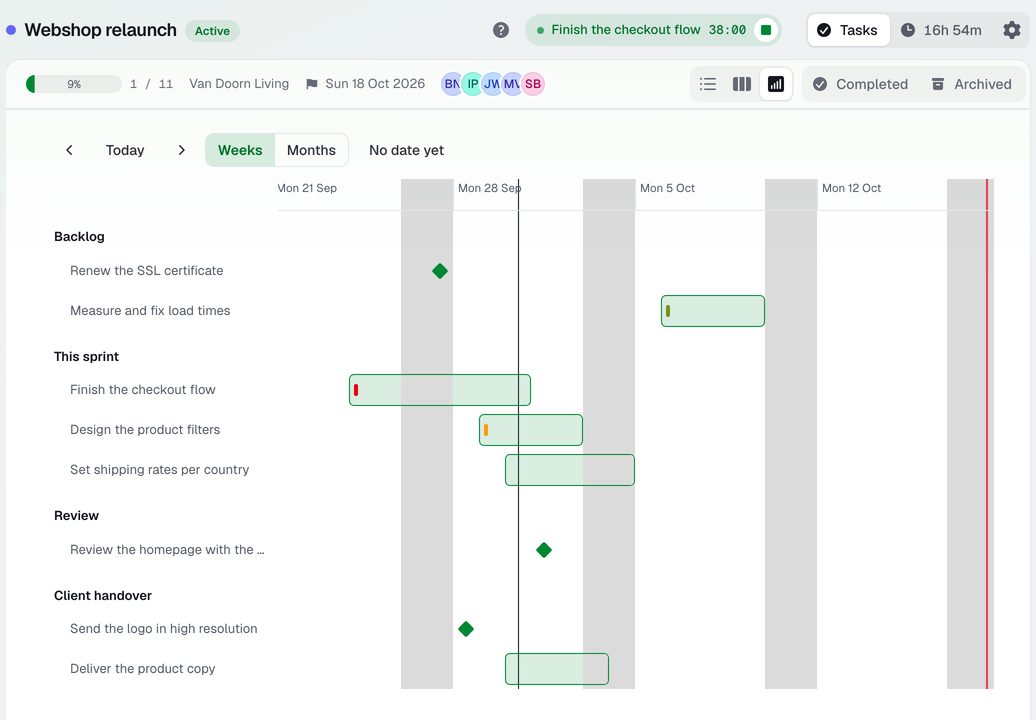
Everything about one task in one place
Subtasks with progress, priority, recurrence, labels, estimated and tracked time, comments with @ and attachments. What happened is underneath it in the activity log.
Try for free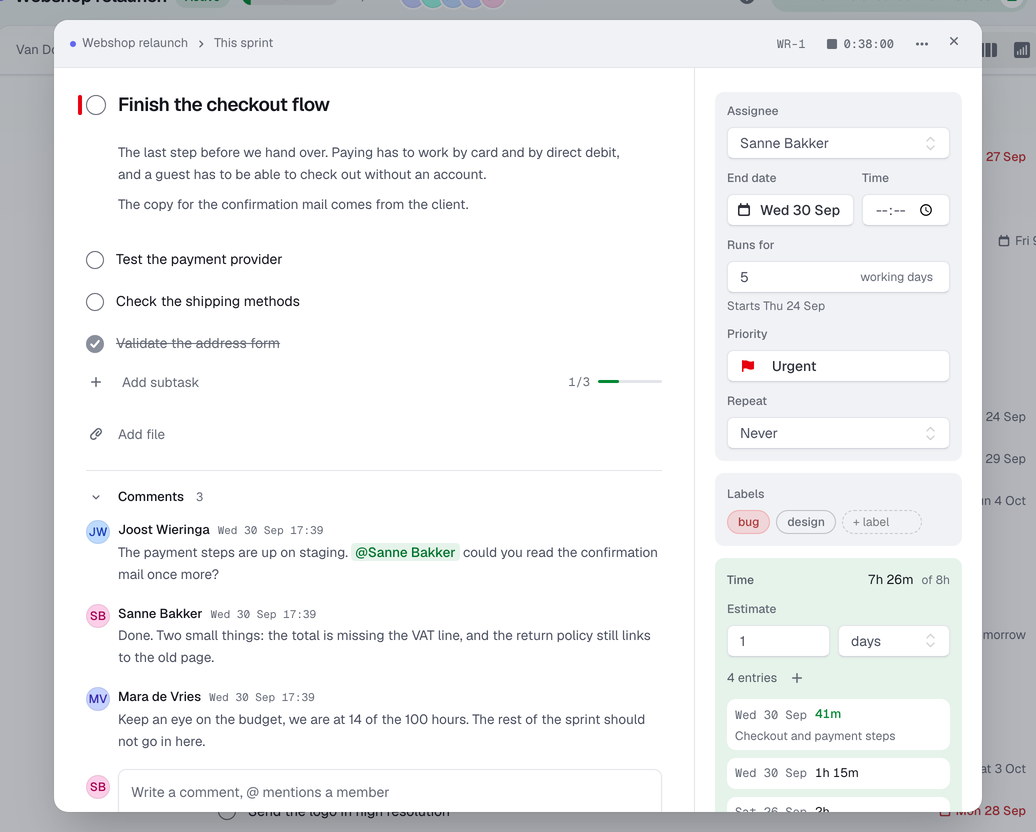
The timer is in here, not in a second tool
Start a timer on a task or on the project itself, or enter hours afterwards with a start and an end time. Filter by member, period and invoicing state, and stamp everything that just went on an invoice in one click. Taskstand does not make invoices, it keeps track of what belongs on one.
Try for free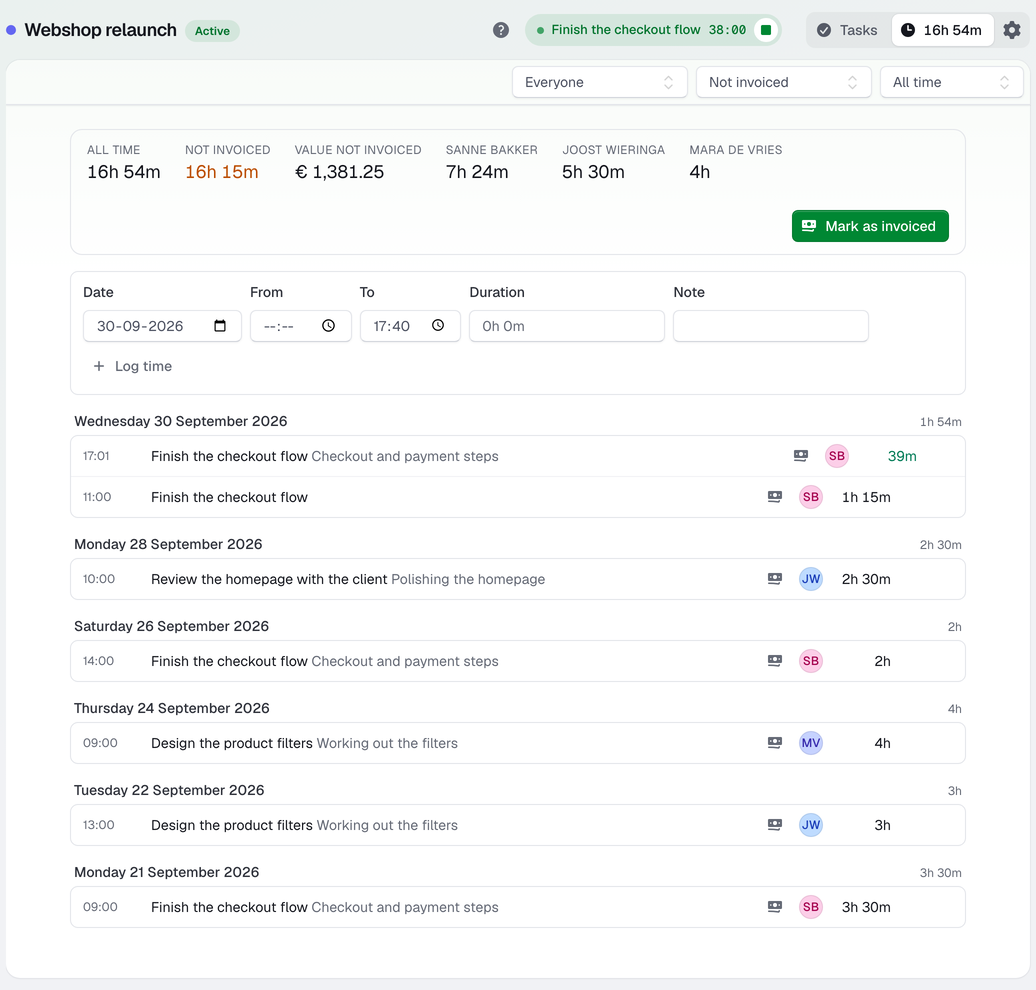
Every hour on one sheet at the end of the month
Group every hour booked by project, by person or by client, with what still has to be invoiced next to it, and take the lot out as a CSV when the invoices go out. Part of Business. On a single project the hours come with every plan.
Try for free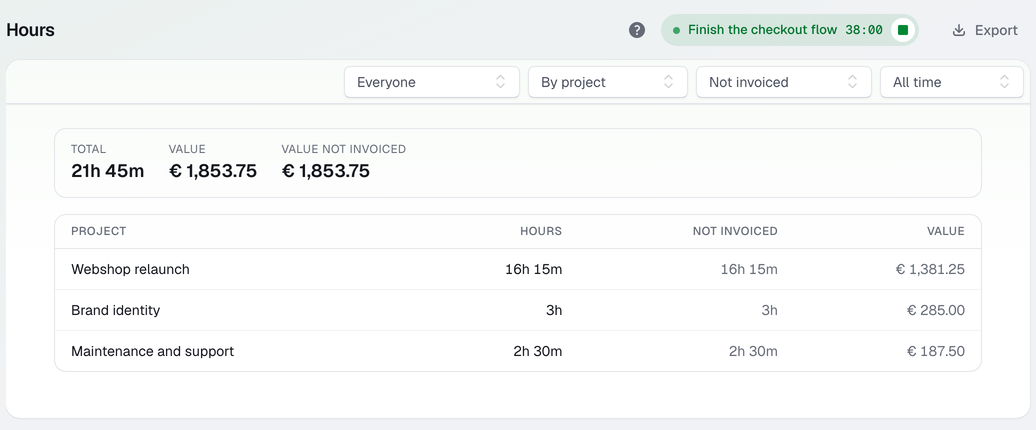
A restricted member only sees what you share
Six roles, from owner to restricted. Invite your client as Restricted and share one section with view or edit access: they see that section and nothing else. No other section names, no member list, no status, no rates, no hours.
Try for free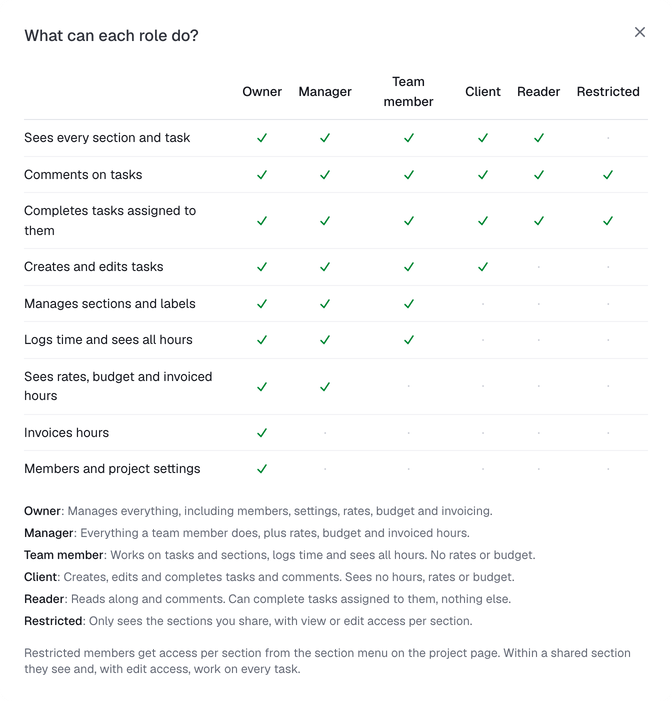
Working in three steps
Create an account
Free, with fourteen days of everything Pro offers. Your language and time zone are right from the start.
Set up your project
Sections, tasks and labels. An hourly rate and a budget if you keep track of those.
Share and track
Invite your team and your client, each with their own role. Start the timer and watch the dashboard tell you what is still unbilled.
Your clients' work stays in Europe
Everything you put in, from tasks and comments to files and hours, is stored in the EU. That matters when it is your client's work.
Stored in the EU
Servers, database, files and backups are in Germany. Mail goes out from the Netherlands.
GDPR included
A data processing agreement is part of our terms, so you can put your clients' data in without signing anything extra.
No trackers, no cookie banner
Visits are counted on our own server without a cookie, and nothing goes to Google or an ad network.
Yours, not ours
We never sell your data and never use it to train AI.
You pay for your own projects
You pay for your own projects and for the people working on them. They pay nothing themselves and keep their own free account, and your plan decides who sees the money.
Every new account gets fourteen days of everything Pro offers, without paying and without a card. After that you pick a subscription, or you carry on for free: your projects, hours and files stay where they are either way.
Free
Tasks and time tracking for a couple of projects. Without rates and invoicing.
Stays free Stays free
- 2 projects
- 3 people across your projects
- 50 MB of files
- No rates, budget or timeline
Plus
For freelancers: more projects, with rates, budgets and what you still have to invoice.
€ 6.05 per month incl. 21% VAT € 60.50 per year incl. 21% VAT
- 10 projects
- 10 people across your projects
- 2 GB of files
- Rates, budget and a timeline per project
Pro
For a small team: more projects, more people and one timeline across them all.
€ 10.89 per month incl. 21% VAT € 108.90 per year incl. 21% VAT
- 50 projects
- 20 people across your projects
- 20 GB of files
- Rates, budget and a timeline, across all your projects at once
- A manager who runs your projects with you
Business
For agencies: room for your whole team and all the clients that come with it.
€ 30.25 per month incl. 21% VAT € 302.50 per year incl. 21% VAT
- 100 projects
- 50 people across your projects
- 100 GB of files
- Rates, budget and a timeline, across all your projects at once
- A manager who runs your projects with you
- Hours across every project, with an export
Prices exclude VAT. Archived projects do not count toward these limits.
Questions?
Send an email. You get an answer from the person who builds it, not from a ticket system.